Conquering Job Applications

Reading Time 2 minutes

60% of job seekers say they’ve quit filling out a job application due to its length or complexity. Ouch! This statistic from Learning Hub certainly highlights the fatigue that many succumb to while navigating varied application requirements. Don’t be a statistic! Stay focused and use this first step as a demonstration of your dedication and work ethic. Get serious about the positions you want and commit to their applications—whether it takes four minutes or four hours. Remember that quality > quantity and use the following tips to ensure your application is straightforward and fully completed.

Completing forms

Your application may require you to upload your resume and electronically answer questions and complete required fields about history and experience. Though this can feel redundant, ensure that each question and field is answered to the best of your ability—never write “see resume.” Don’t rely on copying and pasting your resume information; tailor your responses to the specific question and employer.

Uploading documents

Save all Word documents for submission as a PDF to ensure the formatting will not change when opened by the employer.

Preparing your resume

Before submitting your resume, give it one last spell check and ensure the document name is clear and professional – your full name works well.

Don’t forget to include your cover letter

This may be an optional application field, but attaching a cover letter is a non-negotiable to set yourself apart from the sea of applicants. Don’t see a place to attach your cover letter? Ensure it matches your resume’s formatting, and attach them together.

Crafting a Standout Cover Letter

Reading Time 2 minutes

Ugh. The dreaded cover letter. Does it really get read? Shouldn’t my resume speak for itself? Do not allow these thoughts deter you! If you are a serious job searcher (and we know you are), do not neglect this must-have step. Likely, there are going to be MANY resumes coming across your future employer’s desk. You have to get noticed and a killer cover letter is non-negotiable. Ready to set your application a notch above the rest? Get started with these seven easy tips:

1. Do your research

Well-written cover letters effectively introduce the applicant and highlight resume elements that most closely match the specific job description and company values. So before you start writing, do your research and remember—this is about them! Be prepared to address the recipient by name (‘to whom it may concern’ is not acceptable) and describe how your employment will specifically benefit their organization.

2. Invoke your inner storyteller

Cover letters are exactly that—a letter. This is your chance to get personal with prospective employers and tell your story as it relates to them—meaning each letter should be tailored to the job and follow a narrative structure.
Pro tip: before you start writing your personal letter, create an outline.

3. Be enthusiastic

Be your own advocate and cheerleader. You’re confident, qualified and the best candidate for the job. Your written voice and tone must communicate this!

4. Don’t forget the hook

The person reviewing your cover letter and resume doesn’t automatically owe you a call back. Why should they want to get to know you through an interview? Use your introduction to hook them right away.

5. Connect the dots

Expand upon your unique experiences as it relates to the role—do not simply copy and paste your resume. Provide direct examples of your experience managing tasks similar to the role responsibilities—letting them know just how you will succeed if hired. If you don’t have much workplace experience, you can also cite responsibilities you’ve held in organizations, clubs and during internships.

6. Close with confidence

Let the employer know that you’re looking forward to speaking with them further about the specific ways you will use your skillset to make contributions to the organization. Make sure to thank them for their time and consideration.

7. Hit submit

Walk away for a bit before conducting your final review. We guarantee you’ll find at least one thing to improve with a fresh set of eyes. The last step? Always save as a PDF with a professional file name.

Six Things You Should Do Before Starting Your Job Search

Reading Time 3 minutes

Ready to start dominating your job search? First, make sure your basics are covered! Complete these six simple steps before rolling up your sleeves and diving into those applications.


1. Create a professional email address

An email like ‘gummibearz@gmail.com’ might have been cool when you were younger, but now’s the time to give your email address a glow-up. Create an account with a more direct and formal address. Ensure the address is concise and clearly states your first and last name.

2. Set up an email signature

Add a polished look to your professional emails while also ensuring your contact information is readily available to employers by adding a signature. Include your full name, phone number, email address and link to your online portfolio or LinkedIn account.

3. Update your voicemail greeting

When’s the last time you recorded a new voicemail greeting? Still thinking? Probably time to update. Use this template:

You’ve reached first name, last name—I’m not available at the moment but please leave a brief message and I will get back to you as soon as possible. Thank you.

4. Audit your online presence

It’s estimated that 70% of employers screen job candidates’ social media during the interview process… so it’s time to review as if you are your future employer. As a young professional any pictures of partying, posts with foul language or sensitive personal information should be hidden or deleted.

5. Come up with a game plan

Set basic goals and benchmarks for your job search to avoid getting overwhelmed. What job titles or industries are you most interested in? Are you open to relocation? Determining this criterion early on will save you time and effort. Once established, set a weekly goal for application submissions to help you stay motivated.

6. Prep your paperwork

It may help to peruse examples of resume and cover letters online to find a format you like. Once you’ve written your best resume, ask a trusted mentor or friend to serve as a fresh set of eyes. Ensure your file name is professional – your name and the position title work well. After saving to PDF format and reviewing onscreen, print to ensure all formatting is precise. 77% of employers will immediately screen out a resume with typos or bad grammar—so review, review and then review again.

Writing Your Best Resume

Reading Time 3 minutes

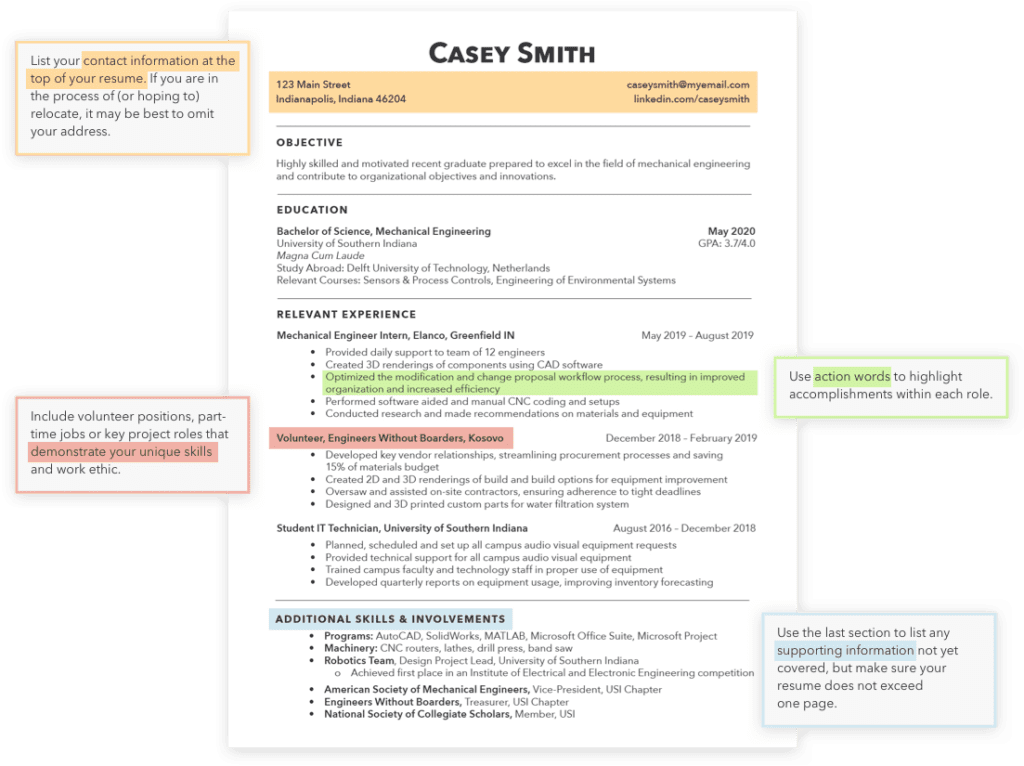
Staring at a blank sheet of paper…wishing your perfect resume would magically appear? Procrastinate no longer-we’ve got you covered! Use the best practices below, and your professional resume will begin to take shape. After your first attempt, step away and then re-review. Send to a trusted colleague and/or mentor for feedback as well.

Lead with a professional objective or summary of qualifications

Include GPA (if above 3.0/4.0) and college honors

Detail relevant college experiences as if it were a job

Include both technical and interpersonal skills

Highlight extracurricular awards and accomplishments

So you have a solid resume foundation but how does it all come together?

Use this recent graduate resume as a guide. Have you covered everything?

Now that you have the content covered, be sure to clean it up with some formatting. Keep the design simple. Use bold, underlines, italics, and supplemental lines to highlight key details or to break up the page. The text should be easy to read (10-14pt classic fonts). Print a sample before finishing and review your work a few more times. Be sure your document is saved properly before submitting for a job application.

Developing Your Professional Network

Reading Time 2 minutes

We know personal relationships with friends and family are of utmost importance, but are you underestimating the power of your professional relationships? What are you doing to cultivate and maintain them? It turns out that in the professional world, having connections certainly does help in more ways than one. Developing and maintaining a healthy professional network can effectively:
  • Enhance your interpersonal skills
  • Help you gain essential industry knowledge
  • Provide various avenues of career support and advice
  • Lead to future job or professional development opportunities
  • Foster relationships that may be beneficial to your career
Believe it or not, you might make a friend or two! Whether you’re a recent grad, young professional or current student, you can foster your network by following these actionable steps:

Use LinkedIn (like, really use it!)

Simply adding folks isn’t enough; actively engaging with new connections is key to nurturing authentic professional relationships online. Read an interesting article related to your field? Share it! Interested in learning new opinions and points of view related to certain subject? Ask away! Your connections will be impressed with your genuine enthusiasm and willingness to get out of your comfort zone and will likely join the conversation.

Scan your inner circle for opportunities—then expand.

Start building your professional network by utilizing your personal circle first! Friends and family, old classmates and coworkers—make an effort to become acquainted with their interests and goals and establish a friendly rapport, no matter their professional field. Once you have a relationship established, don’t hesitate to ask for introductions. Former supervisors, professors and counselors are amazing connections post-graduation as well; keep the lines of communication open as you progress in your education and begin your career!

Get in the mix.

If you still live on campus, you have a professional networking resource right at your fingertips—your career services center! Even if you have already graduated, it is a fantastic avenue to discover networking events, career fairs, mentors and job openings.

Give more than you take.

Ever know someone that demands your time and attention, but doesn’t seem to reciprocate? Or perhaps someone that only pops up out of the blue when they need something? Don’t be that person in the professional world. Relationships are two-sided, so offer support, listen more than you talk and always stay in touch. This will come in handy when you actually do ask for something – like a reference or resume review.

How to Tell Your Story

Reading Time 2 minutes

“Tell me about yourself.”

You’re used to this standard request—in school, sports, clubs and social circles. It is the go-to ice breaker for first introductions. This is also true in the professional world, but the stakes are slightly higher. This is why it’s critical to have an elevator pitch. Not sure what that is? Believe it or not—you already have one!

An elevator pitch is a quick, personal selling statement that is used to introduce yourself during interviews, career fairs or networking activities. A strong elevator pitch is also a foundation to use when writing cover letters and other professional summaries.

Preparing, memorizing and delivering an elevator pitch is time well spent to start any conversation with confidence and direction. In less than one minute, your elevator pitch will tell employers and fellow professionals exactly who you are, what you do and more importantly — why they should care.

To form your elevator pitch, follow these prompts…

Who

Your ideal introduction is authentic, honest and piques someone’s interest right from the start. State your background and provide a little insight as to why you’re enthusiastic about diving into your field.

“My name is Casey. I have a degree in Environmental Science from The University of Notre Dame. My studies focused on water quality—an interest that began with my love for the outdoors and grew exponentially during my research internship with the Indiana Department of Environmental Management."

Why

Close your elevator pitch with a high-quality statement (or question) as it relates to the employer or person —this will explicitly tell them why they should be interested in getting to know you!

“I’ve read your company’s data intake processes are extremely sophisticated. I’d love to learn more.”

Keep in mind that your elevator pitch should be tailored as you meet with different employers. You may use a more barebones approach when professionally introducing yourself to someone you have not researched. Be sure to know your audience and what is an appropriate time range based on the setting you are in. For example, a 30 second to one-minute answer is great for a career fair, but employer may be expecting a 1–2 minute answer during an interview. Always remember that once you’ve delivered your pitch in either setting, it’s now your turn to do the listening. Gather as much information as you can!

How to Use LinkedIn Like a Pro

Reading Time 2 minutes

LinkedIn isn’t just a social media platform—it’s a networking tool and an engaging online resume with true persuasive power. Creating and actively using LinkedIn is an essential aspect of your professional job search; but like most things, you need to properly focus and be intentional to get noticed. Let’s get started.

Take a headshot

Don’t already have a professional headshot? Grab your interview outfit, plain background and a friend (no selfies allowed) to snap a few photos from the shoulders up. Voila! You’re now 14 times more likely to get profile views!

Write a straightforward headline

Many professionals use the headline to simply state their profession—but since you’re still working on that, use this space to describe the role you’d like to have. Move past the simple headline of student at (college/university name).

Set yourself apart in the summary

Leverage this professional biography space to get a little personal, crafting a memorable story that resonates with recruiters in your desired field. Write about your passions. When did it start, and why? What do you hope to do in your field? Use your experience and education to support this narrative, which should be limited to around three paragraphs or less.

Add immersive content to your experience and education sections

Do you have an internship/course presentation, project or assignment that you are particularly proud of? Does it represent your capabilities and future goals in your specified field? If you answered yes to both—go ahead and upload this content to support your profile! Photos, videos, written pieces, links, etc. are all acceptable (just don’t go overboard). Otherwise, your education and experience sections can pretty closely follow your resume. You can also use your resume information for the volunteer and awards section. Can’t fit all your experiences on your resume? Employers can scroll past experiences that are relevant to them, so feel free to list your previous work and collegiate experience. Choose your skills wisely LinkedIn allows its users to list up to 50 skills—but it’s more realistic and honest to start small. Choose around five to 10 skills that you are confident speaking to and demonstrating in an interview. Once you start making connections, your classmates and colleagues can endorse these profile skills.

Check in creatively

It’s obviously important to convey yourself professionally on LinkedIn, but you still want to be you. This is a good point to audit your profile so far—and loosen up if you can! Can you inject more personal flair in your summary copy? Did you remember to add unique project material? In the experience section, did you describe your duties as accomplishments? Go back and ensure these areas are not just informative, but personalized.

Claim your URL

LinkedIn will assign you a random URL upon account creation. Go to ‘edit profile’ and click ‘add custom URL’ to personalize for easy publication. Place this custom URL on your resume for a cohesive brand.

Let recruiters know you’re job searching

Make sure you’ve got the ‘Open to Job Opportunities’ toggle set to ‘yes’ in your profile settings, privately signaling to recruiters that you’re job searching. Once enacted, LinkedIn will prompt you to specify information about the job type you’re seeking and populate your profile in matching recruiter searches.

Leverage your profile

You’ve created a standout profile, now put it to work. Set aside time each day to make new connections (and get to know them!), engage with content, research prospective employers, ask for recommendations, search current openings in your field and always update your profile with new information as applicable.

How to Dress for Success

Reading Time 2 minutes

Obviously, it’s imperative to look and feel your best on interview days! According to College Atlas, 65% of hiring managers note that clothes can be a deciding factor between two candidates. Yes, it’s a big deal, but we’ve got you covered.

Build your basics

Even if you’ve held prior internship positions, making the workwear transition from your college wardrobe can feel…strange. While you don’t have to say a permanent goodbye to your beloved athleisure, start keeping an eye out for suitable interview attire. The key is to start with a neutral foundation — think collared shirts, simple blouses, blazers, a nice pair of shoes and well-fitting pants and/or skirts.

Learn the lingo

Do the words ‘business formal’ and ‘business casual’ somehow seem more complicated than your 300-level mathematics course? Here are a few tips:
  • Business formal is popular in large corporations, government agencies or more conservative companies. For women, this requires pairing a solid-colored blouse, suit jacket, dark tailored pants or skirt (don’t go shorter than just above the knee) with dress shoes—flats or sensible heels. For men, wear a button-down shirt, tie, suit jacket and matching pants with nice shoes — think leather oxfords or loafers.
  • Business casual is obviously a bit more relaxed—no tie required. In this setting, both men and women have more freedom with bolder colors, prints and layering. Women may wear dresses, sweaters, cardigans, chinos, dark jeans and boots or dressy sandals in addition to their business formal attire. Men may wear sweaters, cardigans, polos, khakis, slacks, dark jeans and non-leather loafers if they wish.
Pro tip: When in doubt, err on the business formal side.

Know the “do not” list

Dressing for an interview is pretty straightforward: wear clean, polished clothes and look your best. This does not include:

  • Your college backpack. Time to swap this out for a messenger bag or briefcase.
  • Wrinkles. Save yourself a headache and a trip to the dry cleaner. Buy a small clothes steamer.
  • Stains. This is a no-brainer, but accidents do happen. Avoid eating or drinking in your interview clothes.
  • Jeans. Even if the interviewing office is more casual, this right is usually earned after you get hired.
  • Gum. Pop in a mint and keep a water on hand if you’re prone to nervous dry mouth.

Dress up, not down

Getting to know the company culture is a non-negotiable part of your interview prep, but that doesn’t mean you need to wear jeans if you know people wear jeans in the office. A formal, polished look is always appreciated and will show your sincerity and professionalism. When in doubt, dress up instead of down.

How to Conquer Career Fairs

Reading Time 2 minutes

Remember that famous movie quote “build it and they will come?” A career fair is just that. Companies attend career fairs to meet their future employees; but for you attending is not enough. You need to be well prepared to stand out from the crowd. Here are a few tips:

Create a plan

What companies will be there?  Who do you want to speak with?  Dig into the details and create a plan to make the most of your time (and theirs).

Do your homework

Asking “what does your company do?” will not impress recruiters. A little research goes a long way!  Learn a bit about each company you plan to speak with so that you can demonstrate your knowledge and interest.

Prep your paperwork

Get a second set of eyes on your resume and plan to bring at least twice as many copies as you think you’ll need. It’s better to have too many than to run out.

Dress for success

Make sure your outfit is professional and comfortable.  You’ll likely be on your feet for a few hours, so this isn’t the time to break in a new pair of shoes.

Practice your pitch

You’ll only have a few minutes with each recruiter, so make certain your polished elevator pitch is ready and memorized.

Project confidence

Introduce yourself with energy and enthusiasm – even if it’s the sixth recruiter you’ve met with and your face hurts from smiling.  Firm handshake.  Eye contact.  You’ve got this. 

Follow-up

You came, you saw, you conquered – but the work’s not quite done yet. While at the career fair, ask employers that you talked to for a business card so that you can follow up. To stand out and stay memorable, send a short email to each recruiter you met thanking them for their time and asking to be considered as positions become available. Be sure to attach your resume for their reference.

This site includes information from O*NET OnLine by the U.S. Department of Labor, Employment and Training Administration (USDOL/ETA). Used under the CC BY 4.0 license. AgriNovus Indiana has modified all or some of this information. USDOL/ETA has not approved, endorsed, or tested these modifications.

In addition to O’Net, AgriNovus Indiana gathered information from several resources. If you would like more information about the data on this site, please contact us at fieldatlas@agrinovusindiana.com.

I am…